What Proof Does Medi-Cal Need to Lower Share of Cost?
If you bought insurance to reduce or eliminate a Medi-Cal Share of Cost, the next step is usually proving it to the county. The county may need documents showing that the coverage is active, what the monthly premium is, and when the coverage started. That proof may help reduce your Share of Cost going forward, and in some cases may help with a retroactive adjustment.
This page explains what proof you may need, why immediate proof can matter, and how to upload documents through BenefitsCal.
What documents should you upload? Medi-Cal county workers may ask for different items depending on the case, but useful proof often includes:
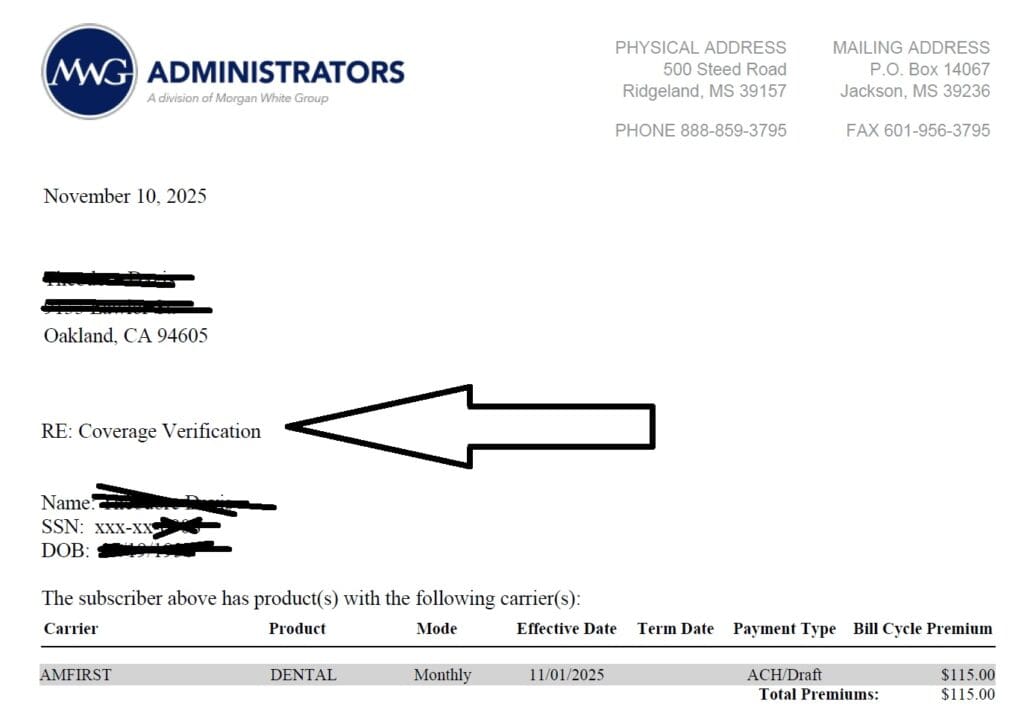
- Proof of coverage letter showing the insurance is active. The AmFirst Plan provides proof within 24 hours!
- Insurance ID card or confirmation page.
- Premium invoice showing the monthly cost.
- Payment receipt or confirmation number.
- Bank or credit card proof if the county asks for proof that the premium was actually paid.
- Effective date showing when the policy started.
Why immediate proof is important: Some plans, such as certain AMFERS dental plans, may provide proof of coverage quickly after enrollment. That can be very helpful when a county worker asks for documentation before adjusting Share of Cost.
This can matter especially when you are dealing with:
- End-of-month timing
- A retroactive Share of Cost correction
- IHSS caregiver or timesheet concerns
- Prescription costs
- Medical bills that were already paid
- A county worker requesting proof before making the change
Need proof quickly? After enrollment, email Steve if you need help locating the proof documents that may be needed for your county worker: [email protected].
How to Upload Documents to BenefitsCal
BenefitsCal may allow you to upload proof documents online, see instructions below, instead of mailing or delivering them in person. After logging in, look for the document upload or case document section. Upload clear copies of your proof of insurance, premium bill, and payment confirmation if available.
Practical tip: Before uploading, rename the files clearly, such as:
- AMFERS-Proof-of-Coverage.pdf
- Dental-Premium-Invoice.pdf
- Premium-Payment-Receipt.pdf
- Insurance-ID-Card.pdf
Clear file names may make it easier for the county worker to understand what you submitted.
After uploading: Save or print the confirmation if BenefitsCal gives you one. You may also want to follow up with your county worker and explain that the insurance premium is being submitted to reduce Medi-Cal Share of Cost.
Common Questions
Can insurance premiums reduce Medi-Cal Share of Cost?
Yes, certain health-related insurance premiums may be used as deductions when calculating Share of Cost. This is why dental, vision, Medicare supplement, or other qualifying premiums may sometimes help reduce or eliminate Share of Cost.
Can Share of Cost be fixed retroactively?
Sometimes. If the insurance was already in effect and the county did not count the premium correctly, you may be able to ask for a correction. See: How to Fix Medi-Cal Share of Cost Retroactively.
What if I already paid medical bills?
Keep copies of bills, receipts, and proof of payment. Some expenses may help meet or reduce Share of Cost. See: How to Use Medical Expenses to Lower Share of Cost.
Can a caregiver upload documents?
A caregiver or family member may be able to help, but the county may require authorization or account access. This is especially important for IHSS-related situations, where timing and proof may affect the person receiving care.
How long does it take?
That depends on the county and the case. Uploading clear proof quickly may help, but it is still important to follow up with the county worker.
Related Share of Cost Pages
- Start here: How to Eliminate or Lower Medi-Cal Share of Cost with Dental Insurance
- Worksheet: Medi-Cal Share of Cost Worksheet
- Already paid medical expenses? How to Use Medical Expenses to Lower Share of Cost
- Retroactive correction: How to Fix Medi-Cal Share of Cost Retroactively
- Dental coordination: Dental Coverage and Coordination of Benefits
- Medigap and Share of Cost: Using Medigap to Lower Medi-Cal Share of Cost
- Working Disabled Program: Medi-Cal 250% Working Disabled Program
- Questions? Email Steve Shorr at [email protected].
What Should You Upload for a New Insurance Premium?
The county may ask for different proof depending on the case. Useful documents commonly include:
- Proof-of-coverage letter showing that the insurance is active;
- Premium invoice showing the amount charged each month;
- Effective date showing when the policy began;
- Insurance identification card or confirmation page;
- Payment receipt, bank record or credit-card confirmation when proof of payment is requested; and
- Cancellation or termination notice when a policy has ended.
Use clear file names so the purpose of each document is easy to understand. Examples:
- Dental-Proof-of-Coverage.pdf
- Monthly-Premium-Invoice.pdf
- Premium-Payment-Receipt.pdf
- Insurance-Effective-Date.pdf
Complete instructions are on our separate proof page:
Do Not Assume That Uploading the Documents Finishes the Job
After submitting the change:
- Save the BenefitsCal confirmation or screenshot;
- Keep copies of everything submitted;
- Contact the county eligibility worker;
- Confirm that the documents were received;
- Explain that the premium is being reported because it may affect Share of Cost;
- Ask the county to complete the eligibility review; and
- Request a written Notice of Action showing the decision and new Share of Cost.
Suggested Message to the County
I am reporting a change in the monthly health-insurance premium I pay. The premium is $_____ per month and became effective on __________. I uploaded proof of coverage, the premium amount and available proof of payment. Please confirm receipt, review the allowable premium deduction, recalculate my Medi-Cal Share of Cost and issue a written Notice of Action showing the result.
Eligibility, deductions and the effective date of a change are determined by the county based on the complete facts and documentation.
Sample Proof of Dental Insurance for Uploading to BenefitsCal.com
View and fill out enrollment application
How to upload proof of Insurance to BenefitsCal.com
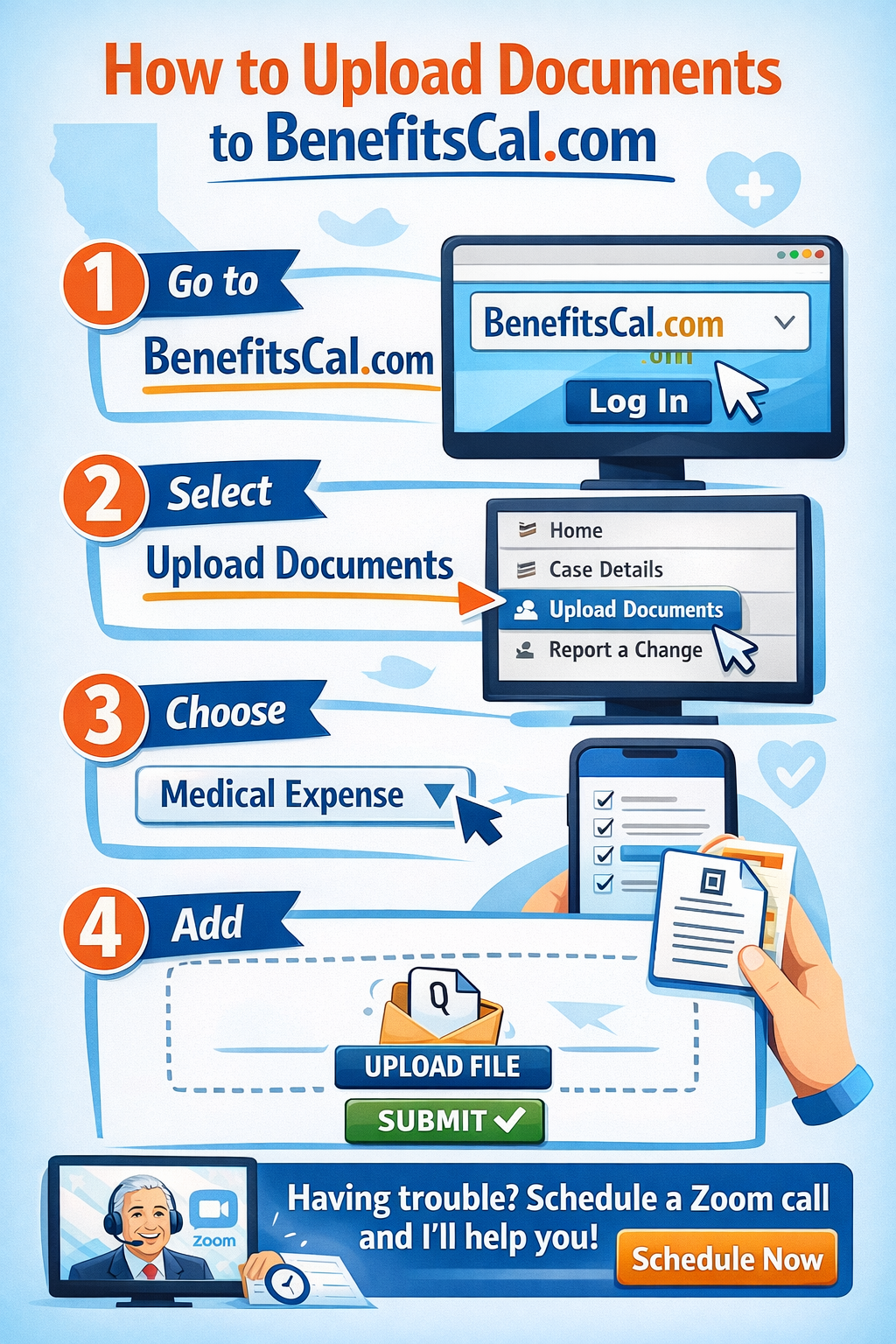
- Visit our main webpage on how to upload documents to BenefitsCal.com
- Covered CA pdf on how to upload to BenefitsCal.com
How to Report a Share of Cost Change Through BenefitsCal
- Sign in to BenefitsCal.
Open your connected Medi-Cal case. - Look for the option to update or report a change.
The wording and location may vary as BenefitsCal is updated. - Describe exactly what changed.
Identify the type of insurance, monthly premium, effective date and person covered. - Upload supporting documents.
Include proof of active coverage, the premium amount and payment when available. - Submit the change.
Review the information carefully before submitting it. - Save proof of submission.
Keep screenshots, confirmation numbers and copies of every document uploaded. - Follow up with the county.
Ask the eligibility worker to confirm receipt and process the information as a Share of Cost change.
When an online report-a-change option is not available or does not fit the situation, contact the county Medi-Cal office.
- Premium Statements: Official billing statements or a formal letter from your insurance company showing the monthly premium cost and the effective dates.
- Payment History: Bank or credit card statements showing that you actually paid the premium.
- Confirmation of Coverage: An insurance application or a confirmation letter from the insurance agent. [3, 4, 5]
How to Submit:Contact your assigned eligibility worker at the
to submit your documents and request a recalculation of your countable income or a reduction in your SOC.
Visit our Main Webpage on Medi Cal Share of Cost & How to eliminate it
By submitting the information below , you are agreeing to be contacted by Steve Shorr a Licensed Sales Agent by email, texting or Zoom to discuss Medicare or other Insurance Plans as relevant to your inquiry. This is a solicitation for Insurance
Contact Form for Steve Shorr Insurance


- Federal Changes Toolkits pdf
- Covered CA Toolkits
- Open Enrollment Tool Kit
- Enrollment Dashboard Guide for Certified Enrollers
- FPL Income Chart
- Strike & Lockout
- QLE Major Life Changes
- SEP FAQ's for brokers Covered CA.com
- Documents to Confirm Eligibility
- Income Section
- social press kit.com/lets-talk-health
- Daily Summary Notices Broker Portal
- Medi Cal to Covered CA
- Forms - Including Paper Application
- 1095 toolkit
- how to generate and print plan summaries
- Service & Operating Hours Covered CA.com
- Social Media Toolkit Covered CA.com
- Daily Summary Emails– Notices
- Information Needed
- Understanding Reasonable Opportunity Period (ROP) & Auto Discontinuance Guide