
my Social Security or Medicare.gov:
Which Online Account Do You Need?
- These are two different government accounts.
- If you want to see an estimate of your future Social Security retirement benefit or apply online for Medicare, start with my Social Security.
- If you already have a Medicare Number and want to see your Original Medicare claims or manage Medicare account settings, use your Medicare.gov account.
- Planning for retirement or applying for Medicare?
- Start with my Social Security.
- Already enrolled in Medicare?
- Need help deciding when or how to enroll?
What Each Account Is For
- my Social Security: See retirement benefit estimates based on your earnings record, review your Social Security Statement, check an application’s status, and manage available Social Security benefit services. Social Security also uses this account when you apply online for Medicare. See Social Security’s account features.
- Medicare.gov account: Once you have your Medicare Number, you can create or connect this account to see Original Medicare claims, keep a prescription list, choose certain electronic mailings, and print an official copy of your Medicare card. See Medicare’s account instructions.
-
Watch: What Is my Social Security?
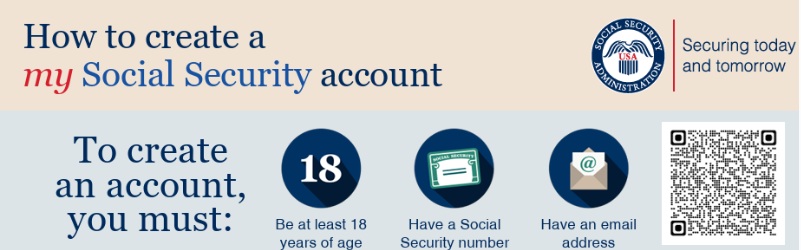
Social Security’s video explains why you might want an account and how to get started. For the current written sign-up steps, keep its account-creation PDF handy as you watch.
Keep the order straight: You can set up my Social Security before you enroll in Medicare.
Medicare says you need your Medicare Number before you can create your Medicare.gov account.
Start Here: Create Your my Social Security Account
For many people approaching Medicare, this is the more useful account to set up first. You can check your earnings record and compare personalized retirement benefit estimates before deciding when to claim Social Security. You can also apply for Medicare without applying for monthly retirement benefits.
- Create or sign in to your my Social Security account.
- Social Security PDF — How to Create an Online Account (Publication 05-10540).
- Social Security — What You Can Do with Your Account.
- Social Security PDF — What You Can Do Online (Publication 05-10121).
Social Security currently directs new users to Login.gov or ID.me for sign-in and identity verification. Its account-creation PDF explains the steps, including what to do if you already use one of those services.
Ready to Apply for Medicare?
Applying for Medicare Part A and Part B is a separate task from creating a Medicare.gov account. Social Security handles the Medicare application. The right enrollment route can depend on whether you are first becoming eligible or already have Part A and are adding Part B.
- Social Security — Apply for Medicare or Retirement Benefits.
- Medicare — How Do I Sign Up?
- Social Security PDF — How to Apply Online for Medicare Only.
- See my web page — Medicare enrollment tools and decisions for enrollment timing and other decisions.
- Watch Medicare’s video — Get Started with Medicare: Your Initial Enrollment Period for an explanation of first-time enrollment timing.
Already Have a Medicare Number? Set Up Medicare.gov
A Medicare.gov account can be useful for checking Original Medicare claims, keeping a prescription list for plan comparisons, choosing electronic Medicare mailings, and printing an official copy of your Medicare card. It is optional for using your Medicare coverage.
- Medicare — Create an Account or Get Sign-In Help. Medicare explains the current ID.me, CLEAR, and Login.gov options here.
- Medicare PDF — Welcome to Medicare: Do These Things Next.
- No Medicare Number yet? Wait until you receive it; Medicare says it is required to create the account.
- Trouble verifying your identity? Use Medicare’s sign-in help page for the appropriate service’s support options, including available in-person verification routes.
Videos, PDFs, and Further Reading
If you prefer to watch a demonstration or keep printed instructions beside you, these resources provide more detail than the quick account links above.
- Social Security PDF — How to Create an Online Account.
- Social Security PDF — How to Apply Online for Medicare Only.
- Social Security PDF — What You Can Do Online.
- Medicare & You — current handbook and language options.
- Medicare — account sign-in and identity verification help.
Video: Keep your existing Social Security account video here if you have watched it recently and its screens and sign-in directions still match the current process. Label it with its actual title and publisher. An older video can still explain the benefits of having an account, but should not be presented as a current step-by-step sign-up demonstration unless its steps remain accurate.
Related Child & Sibling Pages
- Medicare Choices Options Original vs Medicare Advantage – Part D Rx
- ONLINE Account & Enrollment for Medicare & Social Security
- Part A Hospital – when it’s not Free – 40 quarters
- Part B Medicare Doctor Visits Out of Hospital Enrollment or Wait?
- General Enrollment Period GEP January through March if you didn’t sign up on time
- Medicare enrollment, if covered by Employer Plan? Retiring?
- Medicare Part B Late Enrollment Penalty
- Medicare Part B Special Enrollment Period (SEP) if you had employer coverage
- MSP Medicare Savings Program Medi Cal pays Part B premium
- VA compared to Medicare A, B, C, D & Medi Gap
- Why Is Medicare Billing Me for 3 or 4 Months at Once?
- What does Part A Hospital and Part B Doctor Visits cover

Set Up Your Medicare Online Account
(And Avoid Common Mistakes)
Creating your Medicare online account is one of the best ways to manage your coverage, review claims, and protect yourself from fraud.
But before you set it up, there’s one small detail that can cause big problems if it’s wrong…
Does Your Medicare Name Match Your Legal Name?
Example: You go by John Smith, but your legal name is John Jacob Smith.
This may seem minor — but even small differences can lead to:
- Delayed or denied claims
- Problems enrolling in Medicare Advantage or Part D plans
- Identity verification issues when setting up your online account
Best practice: Your Medicare record should match your Social Security record exactly.
✔ Quick Check Before You Continue
- ⬜ Does your Medicare card show your correct legal name?
- ⬜ Does it match Social Security exactly?
- ⬜ Are your doctors and pharmacies using the same name?
If everything matches — great, continue below.
If not, it’s usually best to fix it first to avoid delays later.
How to Set Up Your Medicare Online Account
You can create your secure account directly with Medicare to:
- View claims and coverage
- Check deductible and out-of-pocket costs
- Print replacement ID cards
- Review your plan and drug coverage
Step 1: Go to Medicare.gov and click “Log in / Create Account”
Step 2: Enter your Medicare number and personal information
Step 3: Create a username and password
Step 4: Verify your identity
⚠ Common Issues (We See This All the Time)
- Name mismatch (John vs. John Jacob)
- Wrong address on file
- Old Medicare number or recently updated card
- Identity verification failing online
If something doesn’t work, don’t worry — it’s usually fixable.
💬 Need Help?
We can help you:
- Check if your Medicare record matches Social Security
- Fix name or ID issues
- Walk you through setting up your account
- Scroll down for more information
Email: [email protected]
Schedule a Zoom Meeting:
Click here to schedule
Visit the Official Medicare/Social Security
ONLINE enrollment website
Scroll down or visit our main Medicare Enrollment Page for more information
on how to apply, what the coverages are, what your options are

FAQ’s
Which Medicare Card Should I Use?
If Medicare sent you a new card due to a security issue, here’s how to know which one is correct:
✔️ Step 1: Look at the Medicare Number
- If the number is different from your old card → use the new card
- If the number is the same → either card is fine
✔️ Step 2: Use the Most Recent Card
- The newest card Medicare mailed you is usually the active one
✔️ Step 3: What to Do With the Old Card
- If Medicare told you to destroy it → cut it up and discard it
- This helps protect you from fraud or identity theft
✔️ Step 4: Still Not Sure?
- Call Medicare: 1-800-MEDICARE (1-800-633-4227)
- See above and set up your own Social Security and ONLINE Medicare Accounts.
- Or contact us and we’ll help verify your coverage
Need help reviewing your Medicare options or making a change?
Fix Your Medicare Record
Small mistakes can cause big headaches.
If your Medicare record does not match Social Security, it may delay claims, enrollment, or online account setup.
Quick Self-Check
- Does your Medicare card show your correct legal name?
- Does it match your Social Security record exactly?
- Has your Medicare number or card changed recently?
- Are your doctors, pharmacies, and health plan using the same name?
- Have you had trouble setting up your Medicare online account?
Example: You go by John Smith, but Social Security shows John Jacob Smith.
What To Do
- Check your Social Security record first
- Make sure your legal name is correct there
- After Social Security updates, Medicare usually updates too
- Then notify your doctors, pharmacies, and Medicare plan if needed
Important: Medicare generally follows the Social Security record, so that is usually the first place to fix a name problem.
Need Help Sorting It Out?
We can help you figure out whether the issue is with your Medicare record, Social Security record, or plan enrollment.
Email: [email protected]
Schedule a Zoom Meeting:
Click here to schedule
Fix a Medicare Name or ID Problem
Example: John Smith vs. John Jacob Smith — small difference, big problems
Small mistakes can cause big headaches.
If your Medicare record does not match Social Security, it may delay claims, enrollment, or online account setup.
Quick Self-Check
- Does your Medicare card show your correct legal name?
- Does it match your Social Security record exactly?
- Has your Medicare number or card changed recently?
- Are your doctors, pharmacies, and health plan using the same name?
- Have you had trouble setting up your Medicare online account?
Example: You go by John Smith, but Social Security shows John Jacob Smith.
What To Do
- Check your Social Security record first
- Make sure your legal name is correct there
- After Social Security updates, Medicare usually updates too
- Then notify your doctors, pharmacies, and Medicare plan if needed
Important: Medicare generally follows the Social Security record, so that is usually the first place to fix a name problem.
Need Help Sorting It Out?
We can help you figure out whether the issue is with your Medicare record, Social Security record, or plan enrollment.
Email: [email protected]
Schedule a Zoom Meeting:
Click here to schedule
- Question? Social Security has the wrong spelling – wrong name – How do I fix that?
- Answer:

- Social Security Number & Card # EN 5 10002
- Depending on your situation, you may be able to request your change online.
- Answer a few questions about yourself, and we’ll show you the best way to make your request.
- Application for a Social Security Card (Form SS-5)
- U.S. Citizen – Adult Name Change on Social Security Card
- To change your name on your card, you must show us documents proving your legal name change and identity. You also must show us a document proving your U.S. citizenship, if it is not already in our records. You must present original documents or copies certified by the agency that issued them. We cannot accept photocopies or notarized copies.
- How to change your name with the courts – California


Medicare Billings And Claims
- G-001-Organizing Your Medical Bills – 07-19-12
- G-002-How Medicare Claims Are Processed – 07-19-12
- G-003-Instructions For Creating a Claims Record – 07-19-12
Thank you for your prompt response. Much better than waiting on terminal hold.
Jacqui R